
Thursday, January 10, 2019
17 Android Games You Can Play With Just One Hand

Mobile games are very popular. Everybody plays games on their mobile device be it Android or iOS. However, most people prefer playing mobile games with just one hand because they want to keep the other hand free while commuting or for whatever reasons. If you’re one of those people then you’ve come to the right place because we’ve got the perfect android games for you that you can enjoy with a single-hand, some even with just a finger. Check out the list below for the 17 best Android games you can play with one hand.
1. Crossy Roads
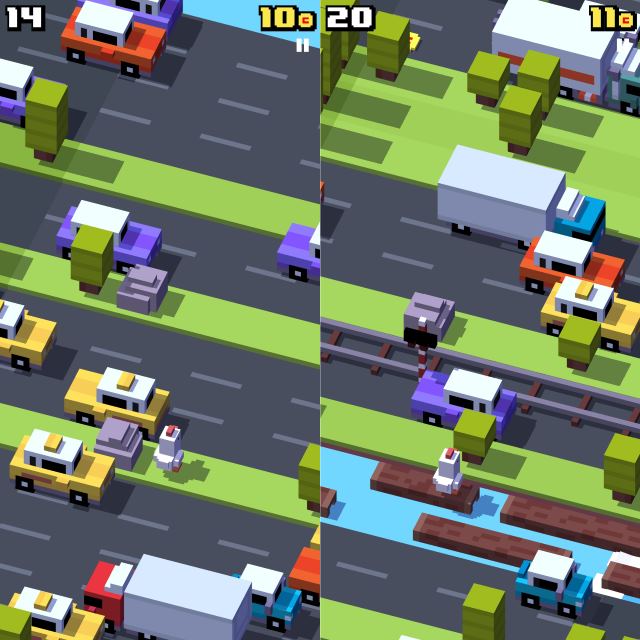
What is it? Arcade.
Why you should try it: When everybody was killing time on Flappy Birds, Crossy Roads entered the scene and won people’s hearts. It’s a simple Arcade game in which you, well, make your character cross the road. Yes, you just have to make sure that you’re not hit by the oncoming traffic, at which point, the game will end and you’ll have to start over again.
To make the game more interesting, the developers have also added train tracks and rivers to the mix. You can also choose to collect coins while crossing the road to unlock new playable characters. It’s a fairly simple game that you can play with just one hand. Heck, you can play it with just one finger, so be sure to try it out if you haven’t already.
Download Crossy Roads (Free)
2. Monument Valley 2
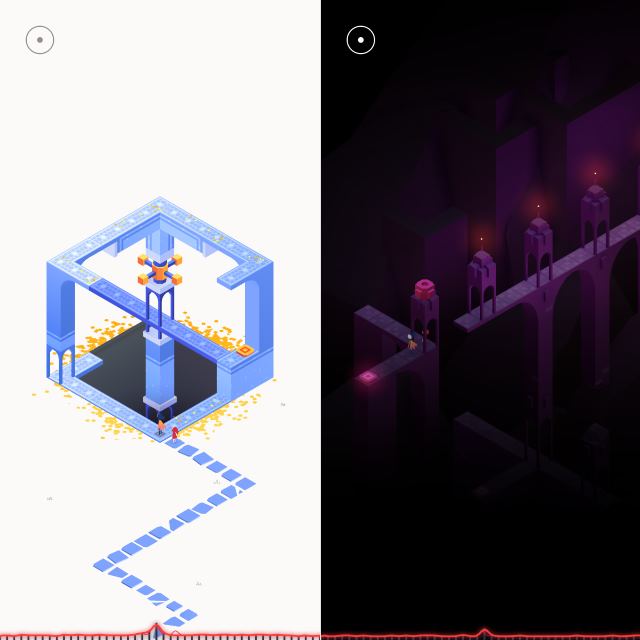
What is it? Puzzle.
Why you should try it: Monument Valley needs no introduction, does it? This award-winning 3D-puzzler is one of the best puzzle games out there. Your objective, in case you don’t know, is to guide a mother and her child on their journey as they make their way through magical architecture, discovering illusionary pathways. The game also has a very interesting story, which we won’t be spoiling for you, but as you can probably guess, it’s all about a mother and her child on a journey through a magical, sometimes scary world, but the best part of the Monument Valley 2 is that you don’t need to have previously played Monument Valley to enjoy this title.
The puzzles, which look beautiful when you first begin the game, keep getting complex as you progress through the game. The puzzles are also dynamic which forces you to interact with the geometric structures. Yes, it sounds complicated but it’s a lot of fun and you can definitely play it with one hand.
Download Monument Valley 2 ($4.99)
3. Mekorama
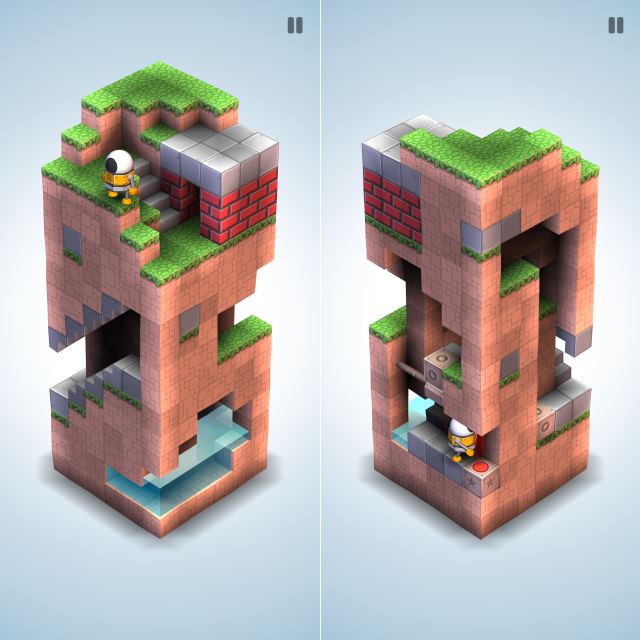
What is it? Puzzle.
Why you should try it: If you are not willing to pay big bucks for a game, then you can try Mekorama. It’s also a 3D puzzler, in which you have to guide your character through geometrical structures. Unlike Monument Valley 2, you’ll be guiding a cute little robot. Despite its small download size, Mekorama is a beautiful game that we think absolutely deserves a spot in your library. The levels are not overly complicated, and you can play this 3D puzzler with just one hand.
Download Mekorama (Free)
4. KAMI 2
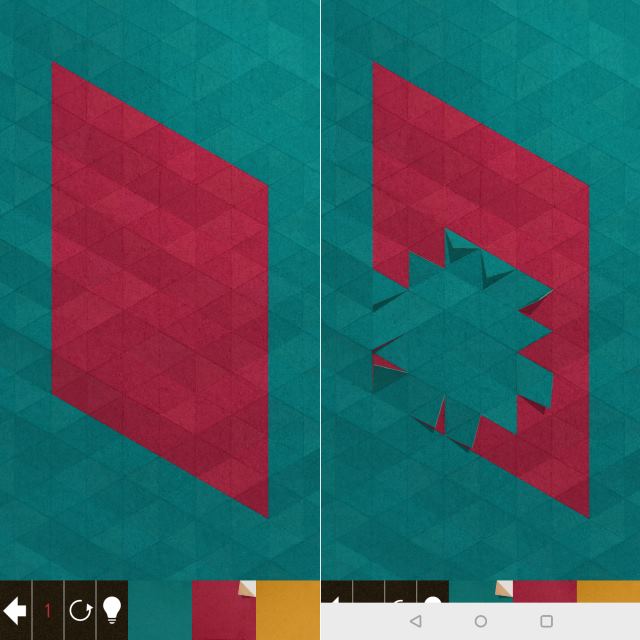
What is it? Puzzle.
Why you should try it: While we are talking about puzzle games, it is hard not to talk about KAMI 2. It’s a sequel to KAMI, which shined as one of the most puzzle games out there. If you’ve never a played a KAMI title before, well, it’s a calming and addictive puzzle game in which you have to match some colors and finish levels with a single color in the end. You have to make sure that you are finishing each puzzle in as few moves as possible to claim a ‘Perfect’ sticker. The game also lets you make your own KAMI puzzle using the game’s Puzzle builder. Overall, it’s a really addictive title that’s worth checking out.
Download KAMI 2 (Free)
5. Orbital
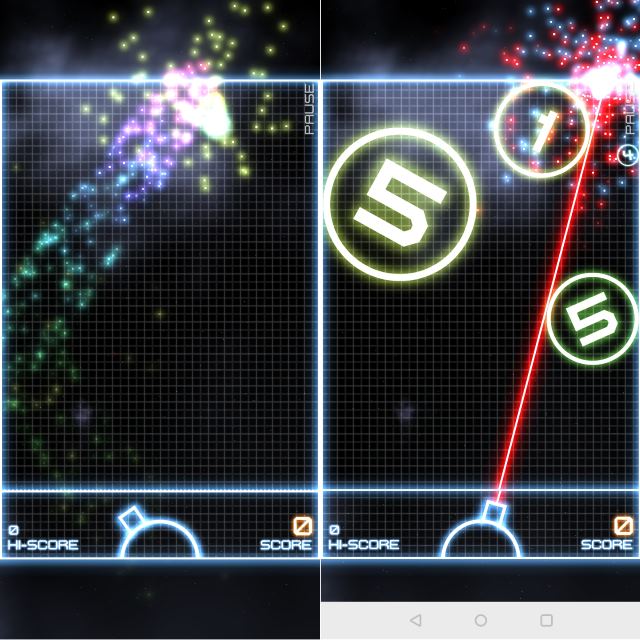
What is it? Puzzle
Why you should try it: Orbital is a critically acclaimed puzzle game, in which your objective is to score points by destroying orbs. Yes, it sounds fairly simple, but the moment you start playing it, you’ll quickly realize that it’s, in fact, one of the most complicated puzzle games that you’ve ever played. We won’t be spoiling the game for you revealing how it’s played mainly because the learning curve makes it much more interesting. The game has beautiful visuals, great sound effects, and addictive gameplay. The free version of the game is limited to just one game mode. It’s super addictive, but you can choose to splurge and get the full version of the game if you happen to like it. And don’t worry, you can indeed play both versions of the games with just one hand. Pretty cool, right?
Download Orbital (Free)
6. Candy Crush Friends Saga
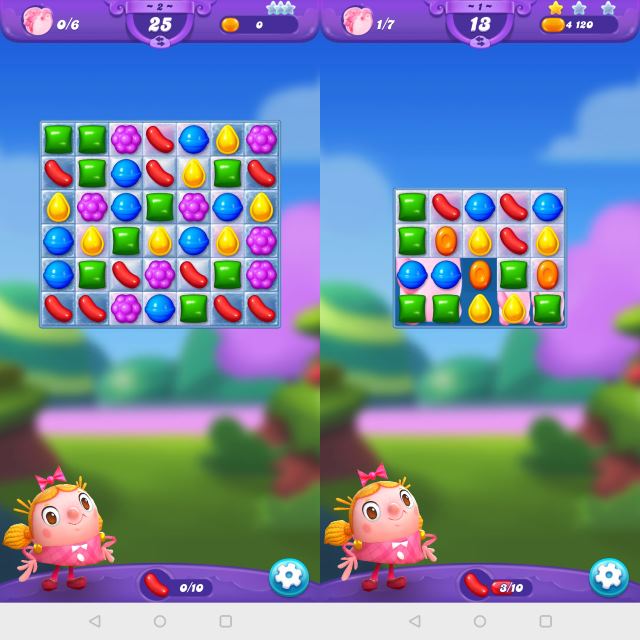
What is it? Arcade.
Why you should try it: Well, if you’ve ever played Candy Crush before, then you’ll feel at home with the new Candy Crush Friends Saga. It’s the newest game in the Candy Crush franchise, and it has updated graphics, fun new game modes, and more. Despite the new game elements, the core objective of the game is still the same. You have to switch and match candies to crush through all the levels in the game. It has hundreds of levels, and you can even play this new title with your friends, which is just awesome.
Download Candy Crush Friends Saga (Free)
7. Peach Blood
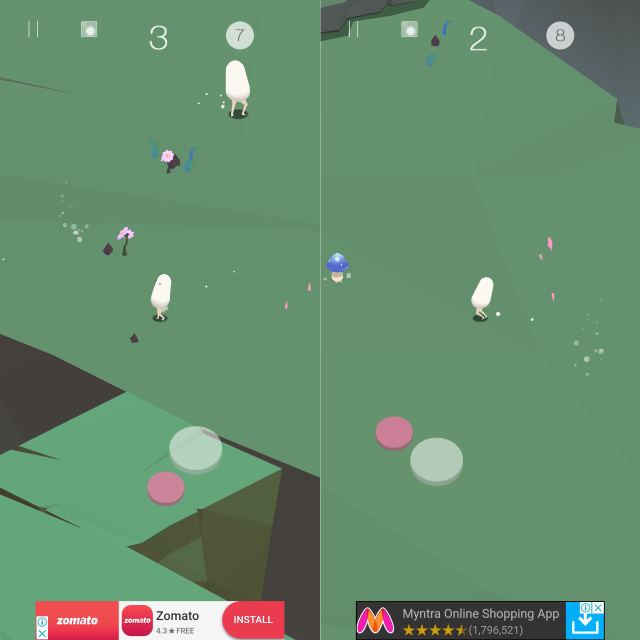
What is it? Arcade.
Why you should try it? Peach Blood is a fun arcade game in which you start off as a tiny Vember. Well, your objective is to eat other Vembers that are smaller than you, so you can grow in size and keep munching on other Vembers. Yes, you can’t mess with the big guys if you don’t want to get eaten up. The Vembers keep appearing endlessly and the survival gets tougher as you progress. In addition to Vembers, you’ll also stumble upon a bunch of mushrooms that’ll give you special powers. But beware of the things you chew because items like ice cubes, light bulbs, etc. will kill your Vember.
Download Peach Blood (Free)
8. Canabalt HD

What is it? Arcade, Endless runner.
Why you should try it: Single-handed games can’t get any easier than a simple endless running game. If you want to enjoy a game on your Android phone with just one hand then Canabalt HD is definitely one of the top games that you should play. This game is available on almost all platforms because it’s one of the best running games out there. The whole world is falling apart and you have to jump from rooftop to rooftop avoiding obstacles along the way. Run as far as you can and achieve the highest score. The game starts off a bit slow and easy but it gets faster and harder the longer you keep running. Keep your eyes out for the falling satellites because those can ruin your entire score in a single moment.
Download Canabalt HD ($2.99)
9. Temple Run 2

What is it? Action, Endless runner.
Why you should try it: One of the most downloaded running games on Android that single-handedly changed the endless running genre on mobiles. Temple Run 2 brings the amazing run and jump action to your android phone. You get to play the game with amazing graphics and a plethora of new characters to choose from. Hundreds of new achievements and power-ups make the game more interesting. New terrains are being added to the game with each new update to keep it exciting and fun for everyone. Get ready to steal the artifact from the temple and start your running because if you stop, the monster will catch up to you and devour your flesh.
Download Temple Run 2 (Free)
10. Subway Surfers

What is it? Arcade, Endless runner.
Why you should try it: Subway Surfers is another very popular running game. It gained popularity because of its simple controls and an amazing art style that keeps changing with each update. This game only requires you to control the characters with just one finger and you don’t have to move the phone at all. Changing lanes requires a swipe to the left/right depending on where you want to go. Just avoid the incoming trains and keep running before the grumpy police officer and his dog catches up to you. Collect power ups and coins along the way to boost your runner and score as high as possible to show off.
Download Subway Surfers (Free)
11. Cut The Rope 2

What is it? Puzzle.
Why you should try it: The cutest little hungry monster is back and he wants to eat candy all the time. Get ready for a fun adventure with little Om nom and help him get his daily dose of candy on each level. Meet new friends and ask them for help. Solve exciting puzzles and figure out a way to get the candy safely to the little hungry monster. Experience completely new levels and a set of new characters to meet in this sequel to the hit original game. Cut the Rope 2 is back with an immense amount of fun and exciting new gameplay style. Use a finger and slice the ropes to release the delicious candy right into Om nom’s belly. He’s counting on you.
Download Cut the Rope 2 (Free)
12. Can Knockdown 3

What is it? Arcade.
Why you should try it: Get ready to test your throwing and aiming skills in this amazing can knocking game. If you have tried your aim in real life by knocking down some cans and bottles with a ball then this game is the perfect thing for you. Enjoy beautiful graphics and knockdown some cans in an amazing 3D world of Can Knockdown 3. It may sound simple but there are some tricky levels that will require serious thinking and a killer aim. Knockdown cans by using correct angle and speed. Knock them all down and attain the highest score on each level. Compete with your friends and see who gets the highest score in this entertaining android game.
Download Can Knockdown 3 (Free)
13. Doodle Jump

What is it? Arcade.
Why you should try it: The popular game that is famous for its simple gameplay and doodle-ish graphics. Doodle Jump is a very simple game where you keep jumping up and up using different platforms and items. Keep going up without falling or hitting a monster. Beat other people’s high score. You will see score markers of other people when you beat them. There are different themes in the game that include but not limited to snow, Halloween, pirates, and much more. Play in any of these levels and try not to get hooked because this game is really addictive.
Install: Google Play Store
14. 2048

What is it? Puzzle.
Why you should try it: This simple yet highly challenging puzzle game has become one of the best games in the recent times. It’s simple, fun, and addictive. Everything you need from a puzzle game is offered in 2048. The main objective of the players is to mix all the tiles together and create one 2048 tile. It sounds simple, right? But it’s far from simple and it get very complex with each merger of tiles.
Install: Google Play Store
15. Vector

What is it? Arcade, Runner.
Why you should try it: Vector is more like a Canabalt game with a lot of different stunts and moves included. This game lets you perform insane stunts and moves that you will find really cool. Get ready to defy the laws of the big brother and break out of control. Get your freedom and run for it as far as you can in this amazing game with an exciting story. Get ready for the best 20 levels you have ever played and perform the most amazing parkour moves that you’ve always wanted to perform in real life. Control it simply with just one finger and slide it in directions to perform different moves. Simple, intuitive, and challenging, it’s Vector.
Download Vector (Free)
16. Badland

What is it? Adventure.
Why you should try it: You can now enjoy this amazing adventure game on your android device. The unique graphics style and simple controls make it one of the best for your Android. If you want simple control scheme with just one tap system and a unique art style along with fascinating gameplay then Badland is the perfect game for you. The physics-based gameplay lets you enjoy the dark environment in the game and keeps you hooked for a long time. Over 100 unique levels are enough to keep you coming back for more and more. Give this game a try if you want to play something unique and simple on your android.
Download Badland (Free)
17. Stick Hero

What is it? Arcade.
Why you should try it: Another game with a very simple gameplay idea. The main objective of the game is to place sticks long enough to cover two platforms so your stick hero can go from one platform to another. However, it’s pretty challenging. If you make the sticks short then your hero will fall in between the platforms and if you make them longer, your hero will still fall at the end of the platform. You have to create the sticks by tapping and holding your finger for as long as you want to make the stick longer. Let go of the screen and it shall fall down between the platforms. Keep placing sticks and helping your hero pass the platforms one by one. Achieve the highest score and secure your bragging rights in this game. Also, the Developers of this game have released a lot of new games since Stick Hero so you may check out their other games too.
Download Stick Hero (Free)
SEE ALSO: 33 Best Multiplayer Games for Android
You can enjoy all these games on your Android smartphone with just one hand. The controls are simple and the gameplay is easy enough for you to play with just one hand. If you think there are other games that are as simple then feel free to mention them in the comments below and we’ll take a look.
from Beebom http://bit.ly/2FkaGqs
15 Amazing Games Like Skyrim You Should Try

If you have been playing The Elder Scrolls: Skyrim for a long time then you know how amazing it can be to explore a vast world filled with numerous quests and opportunities. That’s the beauty of open-world games because you can explore the world and take on quests at your leisure. If you want to play more games like Skyrim then you are at the right place. Today, we bring you some of the absolutely best games like Skyrim that provide you with a huge world to explore and a lot of exciting gameplay elements. Below are the 15 best games like Skyrim that everyone should play, at least once.
Note: The games mentioned in this list are in no particular order, as each of them offers something a bit different from the other.
1. Middle-earth: Shadow of War
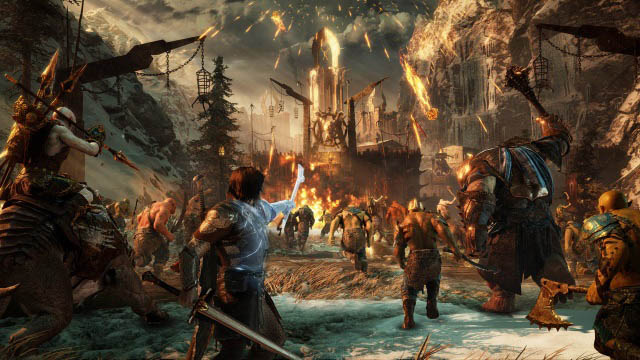
What is it? Open world, Action-adventure RPG
Why you should try it? Middle-earth: Shadow of War, the sequel to the popular Middle-earth: Shadow of Mordor, is an amazing game that you should definitely try if you’re on the lookout for some great Skyrim alternatives. The game, much like its predecessor, is set in the fantasy world created by J.R.R. Tolkien in his The Lord of the Rings franchise and takes players on an epic adventure filled with magic and monsters. The game continues the narrative set in Shadow of Mordor and puts players in the shoes of Talion who still harbors the spirit of the elf lord Celebrimbor. Shadow of War is not that different in terms of gameplay when compared to Shadow of Mordor, but the game uses the new Nemesis engine to bring character stories to life. You’ll go behind enemy lines to the city of Mordor, and use your skills and strategy to turn Mordor against the dark lord Sauron in an epic game filled with things like elves, dwarfs, witches, and obviously, the objective of conquering fortresses filled with enemies. The game offers players a vast, detailed open world and is a must have for any fans of the movies or novels.
Where to buy: Steam, Xbox, PlayStation
Works on: Windows, PlayStation 4, Xbox One
2. Dragon Age: Inquisition

What is it? Open-World, Action, RPG.
Why you should try it: If you have tried the previous Dragon Age games from the franchise then you must know how polished these games actually are. Even if you haven’t played a Dragon Age game before, we recommend that you pick up Dragon Age: Inquisition because it’s one of the best games in the entire series. You start off as the character who has the power to seal off different breaches in the world. Your mission is to settle the civil unrest caused by these breaches. There are demons coming into the world through the breaches and you have to close all of them along with your party. Level up and enhance your character abilities. Choose from a different race of heroes with each race possessing unique abilities and powers. You can also team up with your friends in multiplayer co-op mode and destroy the demons together.
Where to buy: Xbox, PlayStation
Works on: Xbox 360, Xbox One, PlayStation 3, PlayStation 4, Windows
3. The Elder Scrolls IV: Oblivion
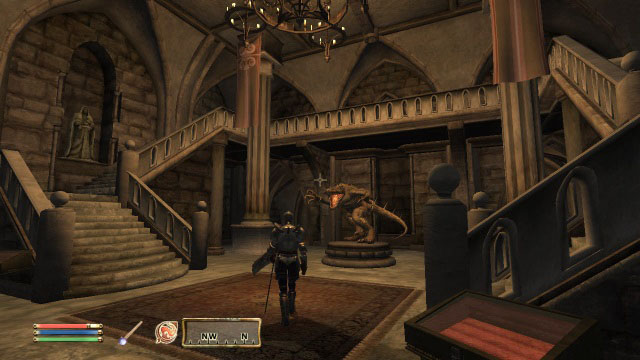
What is it? Open world, Action-adventure RPG
Why you should try it? While Skyrim is undoubtedly the most popular game in the Elder Scrolls franchise, it isn’t the only one that’s worth playing. In case you’ve only played Skyrim and none of the other titles in the franchise, then you should definitely check them out. The Elder Scrolls IV: Oblivion is one such game in the franchise which is worth playing. Granted that it might look a bit dated when compared to Skyrim, but the gameplay and storyline are as good, if not better. The Elder Scrolls IV: Oblivion offers the closest Skyrim-like experience out there, making it a must have for all Skyrim fans. The game even uses AI to add life to non playing characters, each of which have their own stories and goals that they complete on their own — it’s pretty impressive and gives the game a very realistic feel. In The Elder Scrolls IV, you’ll find yourself in an immersive first-person world, complete with awe-inspiring combat and magic. The Elder Scrolls IV: Oblivion offers the closest Skyrim-like experience out there, making it a must have for all Skyrim fans.
Where to buy: Steam, Xbox, PlayStation
Works on: Windows, Xbox 360, PlayStation 3, Xbox One
4. Dark Souls III
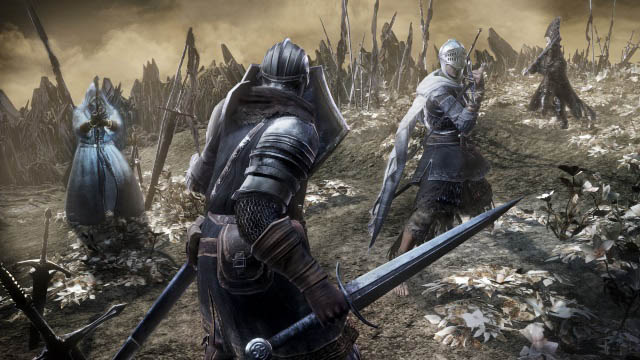
What is it? Action RPG
Why you should try it? If you’re not really interested in the role-playing elements offered by Skyrim and are looking for an alternative that focuses more on the medieval combat, then you shouldn’t miss Dark Souls III. The game builds upon the last game in the franchise and brings to you a story line like no other. In the game you play as The Ashen One who is on a mission to postpone the coming age of dark by saving the First Flame from dying out. The game’s dark and ominous design perfectly complements the story and gives players access to a ton of different weapons to take down anyone who stands in their path. In Dark Souls III you’ll enter a world of bigger environments and even bigger enemies, and thanks to the fast gameplay and exciting, nerve-wrecking combat (with extremely precise combat controls) you’ll be hard pressed to put this game down once you’ve started playing it. Try out Dark Souls III if you’re looking for a Skyrim alternative that offers arguably better combat mechanics and an equally riveting story line.
Where to buy: Steam, Xbox, PlayStation
Works on: Windows, Xbox One, PlayStation 4
5. The Witcher 3: Wild Hunt

What is it? Action-Adventure, RPG.
Why you should try it: One of the best games of last year. The Witcher 3: Wild Hunt set the bar too high for other role-playing games. The detailed environment, amazing interactions, fluid combat system, and a vast world ready for exploration are some of the great things this game has to offer. Control Geralt and use his powers to fight all that is evil. Use swords or magic, whichever you like and fight the monsters that are causing trouble in the world. The game has received numerous awards for the amazing storyline and an immersive gameplay. A must have for all the open-world role playing fans.
Where to buy: Steam, Xbox, PlayStation
Works on: Xbox One, PlayStation 4, Windows
6. Kingdom Come: Deliverance
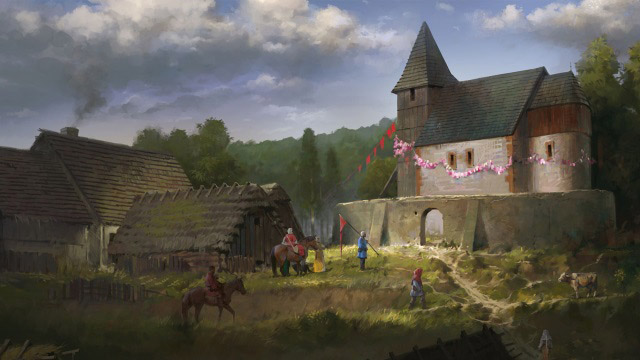
What is it? Open world, Action RPG
Why you should try it? Set in the early 15th century in the Kingdom of Bohemia, Kingdom Come: Deliverance is another great open-world RPG that you should definitely try if you’re looking for games like Skyrim. The game puts players in the shoes of Henry, a blacksmith’s son, who’s village and family are brutally massacred by Sigismund of Luxembourg’s army. Fueled by revenge, Henry vows to put an end to his parents’ killer and heads forth on an adventurous journey filled bloodshed. Other than a riveting story line, the game features almost all the elements you’d find in an immersive action RPG, which is reason enough for you to get it right away.
Where to buy: Steam, Xbox, PlayStation
Works on: Windows, Xbox One, PlayStation 4
7. Neverwinter

What is it? MMORPG.
Why you should try it: Remember the classic Dungeons & Dragons games? The books? The cartoons? Well, you don’t even have to remember any of those to enjoy the amazing Neverwinter game that takes part in the Dungeons & Dragons world. You can choose any one of the 8 different classes in this game. Each class possesses different abilities and powers that you can improve with character progression. Team up with your friends in party to raid dungeons and slay monsters. Loot powerful weapons and artifacts and indulge in the rich story of Neverwinter that keeps getting better with each new update. It’s like playing World of Warcraft on your Xbox.
Works on: Xbox One, Windows
8. The Elder Scrolls Online
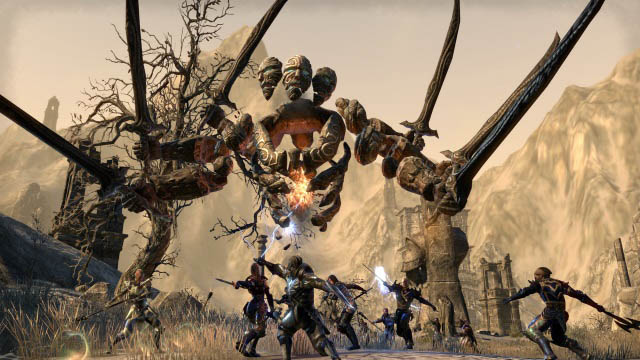
What is it? MMORPG
Why you should try it? Fans of Skyrim who are looking for a similar adventure but on a much larger scale should definitely go ahead and purchase The Elder Scrolls Online – an epic MMORPG based in the same universe. The game features all the aspects of a great role-playing game, with the addition of an ever expanding world which is also populated with thousands of other players from around the world. The game brings the same amount of customisation you expect from Elder Scrolls so your character can look exactly the way you want it to. The game allows you to pick and choose the skills you learn, the weapons you use, and basically create your own style of play. In the game, you set off to regain your lost soul and save the world. You can pick and choose stories to experience in any part of the massive world, plus, you can play epic PvP campaigns, or engage in simple PvE exploration.
Where to buy: Steam, Xbox, PlayStation
Works on: Windows, macOS, Xbox One, PlayStation 4
9. World of Warcraft

What is it? MMORPG.
Why you should try: World of Warcraft commonly known as WoW is the best MMORPG out there. The game has one of the richest and detailed storylines you will ever see in a game. Different NPC (Non-Playable Characters) have the greatest tales to tell you. Teaming up with biggest heroes of the Warcraft universe and taking down even biggest villains is what makes this game just pure enjoyment. If you are looking for a vast world with a lot of quests and a bucket load of monsters to slay then World of Warcraft is the game for you. Customize your character in any way you like and embark on the biggest adventure of your life in this classic yet exciting game. New expansion releases soon and it brings some of the best characters back in the game.
Where to buy: Battle.net
Works on: Windows, OS X
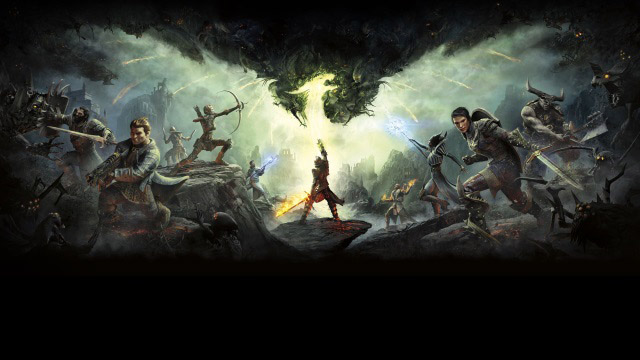
10. Dragon Age: Inquisition
What is it? Action RPG
Why you should try it? The third instalment in the Dragon Age franchise, Dragon Age: Inquisition is an action RPG set in the fictional world of Thedas, offering players an engrossing story line and the usual RPG elements, including in-depth character customization and a detailed crafting mechanic. The game also features some great non-player characters who you can interact with, which adds value to the overall gameplay. In the game, the land of Thedas has fallen into turmoil, and it’s up to you and your party of legendary heroes to play as the Inquisitor and settle the civil unrest. You’ll also close mysterious breaches in the sky that unleash demons on the world. Plus, the game’s world changes based on your playing style so what you do here actually makes a difference in how the in-game world reacts.
Where to buy: Origin, Xbox, PlayStation
Works on: Windows, Xbox 360, Xbox One, PlayStation 3, PlayStation 4
11. Divinity 2

What is it? Action-Adventure, RPG.
Why you should try it: Divinity 2 focuses on some of the core elements taken from popular games like Diablo and WoW. These elements include upgrading equipment, enchanting equipments, etc. The gameplay, however, is quite different because the main objective is action and the whole hack n slash thing. Completing quests, solving puzzles, and beating enemies grants you experience. The more you progress, the better you can develop your character just like any RPG out there. You can necromancy spells to summon a monster to fight alongside you, create your potions for different effects, and much more. There is a vast world full of NPCs offering quests and you can explore the world, completing quests and earning respect at the same time.
Works on: Xbox 360, Windows
12. Dragon’s Dogma

What is it? Action, RPG.
Why you should try it: Dragon’s Dogma maybe a last generation game but it has received so many positive reviews from different gamers and publications that it’s a must play for everyone in the genre. The game takes part in an fantasy open-world where you can explore at your leisure and do quests when you want. Choose your faction and become the best Warrior, Sorcerer, Fighter, etc depends on which faction you choose. Each faction has a different type of combat system that gives it a unique touch. You can play with AI controlled party members who obey your commands and aid you in your quests. The game is pretty similar to Skyrim and even Capcom’s own Monster Hunter series as well which makes it a worthy game that everyone should try out.
Where to buy: Steam, Xbox, PlayStation
Works on: Xbox 360, PlayStation 3, Windows
13. Kingdoms of Amalur: Reckoning

What is it? Action, RPG.
Why you should try it: The developers behind this game went bankrupt after releasing this game but honestly, it’s one of the best single-player role-playing games out there. You get so many choices in this nearly 22 different abilities in each class. You can upgrade these traits and enhance your character to develop into the perfect warrior or mage. Combat system is based on countering system, you have to time your button presses to perform combos just like an action game. You can do whatever you want in this game and each action will have its consequences in the end. This is like the GTA of fantasy world so definitely a must play for everyone.
Where to buy: Steam, Xbox, PlayStation
Works on: Xbox 360, PlayStation 4, Windows
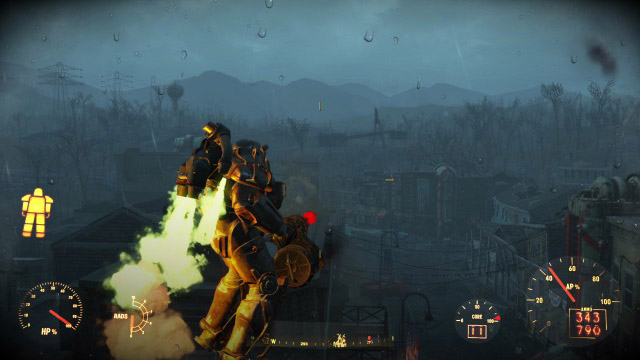
14. Fallout 4
What is it? Open world, Action RPG
Why you should try it? In case you’re on the lookout for a game like Skyrim that’s not based in the medieval times, then you should definitely take a look at Fallout 4 – an impressive action RPG that has a post-apocalyptic setting. In Fallout 4, you emerge out of a secure underground vault, several years after the surface has been devastated by a nuclear war, in search of your missing son. The game offers an impressive story line, innumerable side quests and customization which will keep you hooked to the game. But don’t get too involved with the main story line, because another settlement needs your help.
Where to buy: Steam, Xbox, PlayStation
Works on: Windows, Xbox One, PlayStation 4
15. The Witcher 2: Assassins of Kings

What is it? Action-Adventure, RPG
Why you should try it: Geralt of Rivia is the main protagonist in this game and he’s a witcher. He used his sword fighting skills and sorcery to destroy monsters that are causing trouble in the kingdom. You are wrongly accused of assassinating the king and now it’s your job to break out of prison and prove your innocence by catching the real kingslayer (not Jaime though). If you haven’t played The Witcher 2 then you should definitely try it before picking up The Witcher 3. The story progresses from one game to the other and it will make your gameplay experience even better.
Works on: Xbox 360, Xbox One (via Backward Compatibility), Windows, OS X, Linux
SEE ALSO: 13 Strategy Games Like Clash of Clans
Now is the time to take that arrow to the knee and take a break from Skyrim for a while. The above mentioned games should be enough to keep you occupied and take your mind off of Skyrim for a long time. If you think there are other games like Skyrim that should be in the list then feel free to mention them in the comments section below.
from Beebom http://bit.ly/2RAT931
20 Cool Facebook Tricks You Should Know

Facebook is the most popular social media platform out there and even though many other social media platforms have risen in the past couple of years to challenge its authority, Facebook has retained its numero uno position. You might love it or hate it but chances are, you use it a lot and that means, a few tricks should always come in handy. I love these tricks as not only they allow me to get the most out of my Facebook account, but they also allow me to do some pretty cool things which I love. So, if you also want to make the most of your Facebook, here are the 20 best Facebook tricks that you should know about.
1. Check How Much Time You Spend on Facebook
If you’re concerned with how much time you’re spending on Facebook, you’ll be glad to know that instead of relying on third party apps, or waiting for your phone to get Digital Wellbeing or Screen Time features, you can use the Facebook app to check how much time you’re spending on it. Facebook shows a handy bar graph of your usage of the app over the last week along with your average usage time.
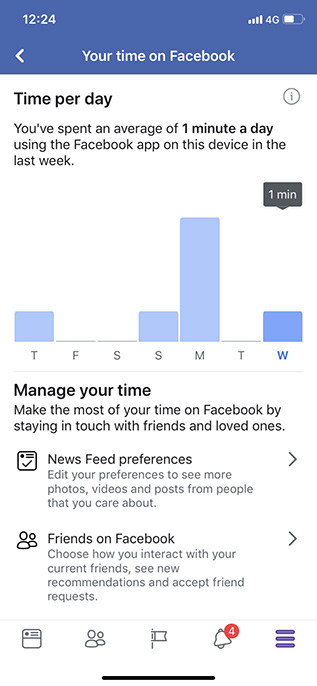
It’s pretty handy, and if you want to use it, here’s how to check how much time you spend on Facebook.
2. Limit Your Facebook Usage
If you used the last trick to figure out how much time you’re spending on Facebook and were surprised to see a very high number there, well, rest easy because you can try and limit your usage of Facebook as well. There are a bunch of ways to do that actually.
From the Facebook App:
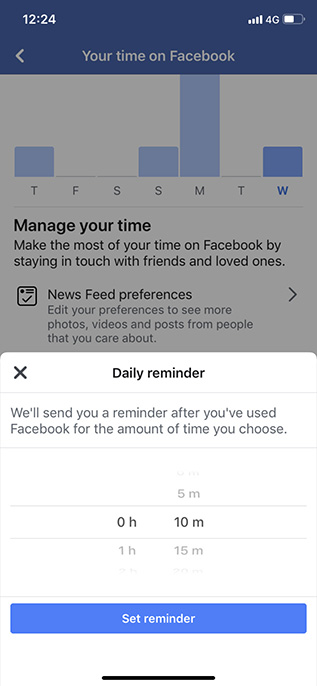
Where you see the time you’re spending on Facebook, there’s an option to set a reminder after which the app will inform you that you’ve spent enough time on Facebook. That can be handy, but it can also be easily bypassed.
Use Digital Wellbeing or Screen Time to Limit Facebook Usage:
If you want to implement a more strict time limit on your Facebook usage, you can use either Screen Time (if you’re on iOS), or Digital Wellbeing (if you’re on a supported Android Pie device) to do this. Both of these features allow users to set time limits on specific apps which should definitely help you limit your Facebook usage. You can check out our articles on how to set time limits on individual apps in Screen Time and Digital Wellbeing to get started.
3. Bulk Delete Third Party Apps from Your Account
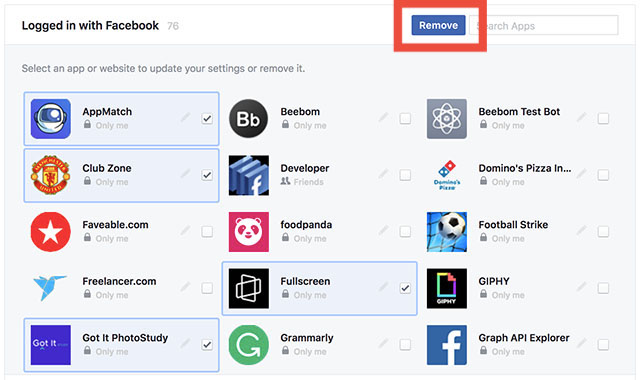
A lot of websites, online games, and apps offer the ability to log in with your Facebook account, and while you may have done that a bunch of times without putting too much thought into it, if you’re worried about such apps stealing or misusing your data, well you can delete them from your account. What’s better is that you don’t have to delete every app individually; you can actually select all the third party apps you want to delete, and get rid of them in a single click. It’s pretty easy and you can check out our article on bulk deleting third party apps from a Facebook account if you need help.
4. Control Notifications Like a Pro (Android Only)
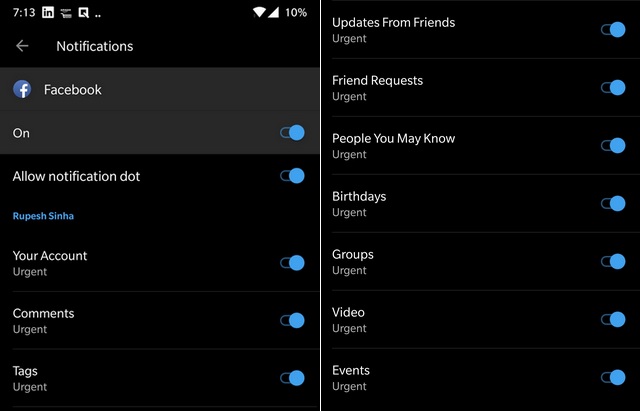
With Android Oreo, Google started rolling out Notification Categories allowing app developers to put more notification controls in the hands of the users. Facebook adopted this back in August and if you’re using an Android phone running Oreo or higher, you can make use of these notification categories to control what kind of Facebook notifications you receive and even control their priorities. There are notification categories for birthdays, people you may know, groups, videos, and a lot more. You can check out our article to learn how to use Notification Channels for Facebook to ensure you only receive notifications that actually matter to you.
5. Find All the Photos Liked by You and Your Friends
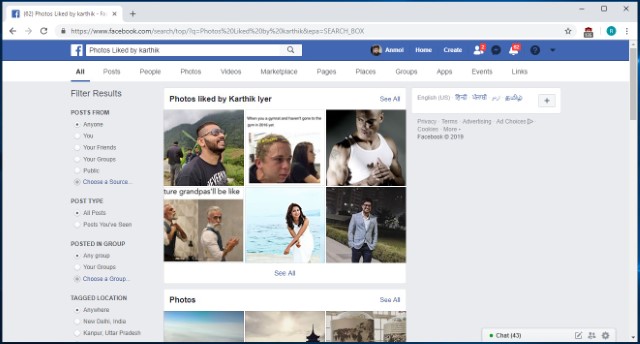
This is a fun nifty Facebook trick that not many people know about. Basically, this feature allows users to see which pictures they have liked in the past. In fact, you can even use this feature to see which photos your friends have liked. The best part is that the trick is pretty easy to execute. Just click on the search bar at the top and type in “Photos Liked by” followed by either “me” or the “name of your friend”. For example, in the picture below, I have searched for “Photos liked by Karthik”, and Facebook is showing me the collection of photos that Karthik has liked.
6. Re-watch the Content that You Missed by Accidental Refresh
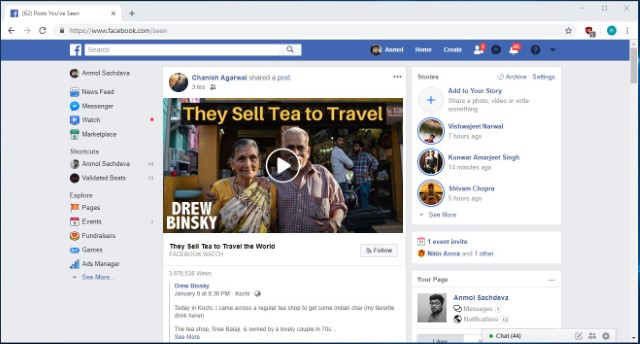
I don’t know how many times I have accidentally refreshed my Facebook feed only to curse myself later as the post that I was looking at was lost. Well, with this trick, you will be able to see the feeds that you have lost due to any accidental refresh. When we accidentally refresh our Facebook feed, Facebook considers that the current feed is already consumed by you and marks it as seen. You can access this feed by going to Facebook and adding “/seen” at the end of the normal URL. So basically you can simply visit the “www.facebook.com/seen” URL to see the content that you have missed.
7. Download your Facebook data
If you have been using Facebook for a number of years now, your account must pack-in tons of your personal data like photos, videos, posts, messages, info and more. And the good thing is Facebook lets you download all of your profile data.
To do it, just head over to Facebook Settings and in the “General” tab, you should see an option at the bottom saying “Download a copy of your Facebook data“.

Then, click “Start My Archive“, after which Facebook will prompt you to enter your password again, as a security measure. Facebook will then gather all your data and send you an email once the download is ready.

8. Watch Facebook Videos With Your Friends
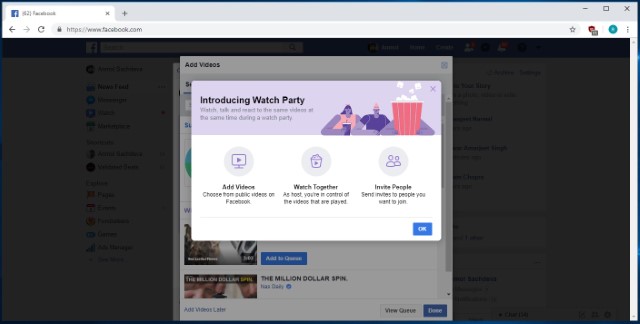
Facebook Watch Party is a new feature from the social media giant which aims at bringing collaborative viewing for distant friends. The feature basically allows users to create a watch party group, where all the members will be able to watch any public videos on Facebook in real time. There are various ways to create a watch party, with the easiest being from your home page. Just click on the “create a post” area and then click on the three-dot menu. From here, click on the “Watch Party” button and follow on the on-screen instructions to invite the friends that you want to watch videos with. It’s a cool way to enjoy your favorite videos with friends and I kind of love it.
9. Search for Open Jobs in Your Area
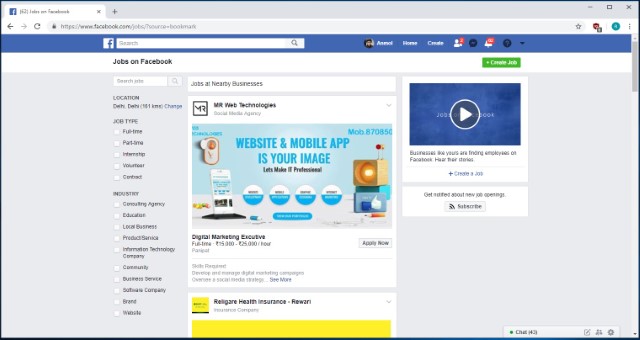
Slowly and slowly, Facebook is trying to branch away from just being a social media platform as it is starting to offer more and more services. One of those new services is the ability to look for open jobs in your area. The number of people who are looking for and getting jobs from Facebook is increasing year over year and you should not miss this train. The “Jobs” page is hosted under the “Explore” section of Facebook (Click on the “See More” button if you don’t see it), and you can click on it to see jobs posted in your area. While this feature is still in its starting stage, you can find some quality job postings here.
10. Create Fund-Raising Programs
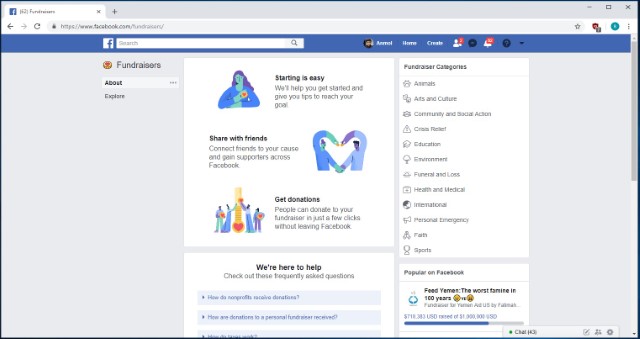
This trick is one of the newest additions to Facebook and it is for a good cause. The feature basically allows users to start fund-raising campaigns and donate to other programs if they want to. The option to create a fund-raising program can be found under the “Explore” section as “Fundraisers“. Once you click on this option, you will be taken to the fund-raiser page where you will be given step-by-step directions to create your fundraiser program. Here, you will also find the links to programs that are already running so that you can donate to them if you agree with the cause.
11. Unsend Messages in Facebook Messenger
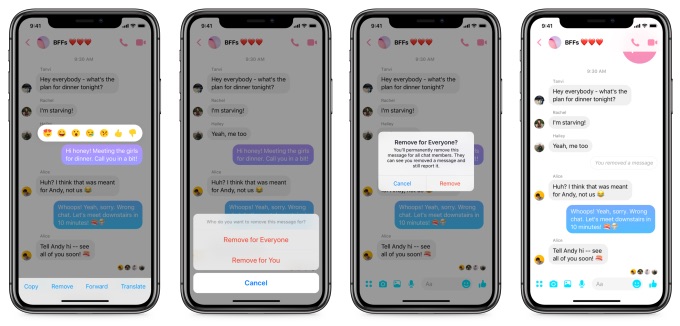
After delaying for a long time, Facebook has finally introduced a new feature which allows you to unsend a message in Facebook Messenger. Do note that Messages will only be unsent within 10 minutes of sending them. This is a security measure which ensures that no one can change their messaging history. The process to unsend the messages is pretty simple. Just tap and hold on the message you have sent and then tap on the “Remove” button. Now, you will get the options to either “Remove for everyone” or “Remove for you”. Select the former option to unsend your message.
Do note that this feature is rolling out in stages and hence it’s not available to everyone as of writing this article.
12. Zoom Images on Facebook without clicking them
Clicking to view each and every image on Facebook to get a larger view is not the most user friendly way and that’s why the Photo Zoom browser extension for Facebook is so popular. The extension integrates a feature onto the Facebook that lets you view a larger size of images when you hover over it.
All you need to do is install the Photo Zoom extension on Chrome or Firefox and open up Facebook. Then, hover around a picture and you should see the image in a larger view.

13. Invite all your Facebook friends to Like a page at once
Have you ever tried inviting your friends to like your cool new Facebook page? Inviting them one by one can be a daunting task. Thankfully, a cool browser extension dubbed “Facebook Invite All” lets you invite all your friends to like a page at once.
To do it, install the extension on Chrome or Firefox and then go to the page where you want to invite people. Click on the “Invite friends to like this page” and a pop-up should open up.

Then, just click on the extension icon at the top right and all the friends will be automatically invited. It’s important to note that the process may take longer if you have a lot of friends.

14. Stop autoplay videos on Facebook (Web and Android/iOS Apps)
Autoplay videos on Facebook can be very annoying, especially when you are simply scrolling through the news feed. The good news is Facebook lets you turn them off natively on the web, as well as on its Android and iOS apps. Check out our post on how to stop autoplay videos on Facebook to do it easily.
15. Post updates in multiple languages
If you have a Facebook page that caters to people from diverse countries, you would want your posts to connect with people in their native language. While Facebook has a built-in translation feature, it does not work as well as you would like. Thankfully, Facebook recently introduced the ability for Pages to post in multiple languages manually. The feature is currently only available for Pages but we hope it comes to Profiles as well in the future.
Before you start posting updates in multiple languages on Facebook, you will have to first enable the feature. To do that, go to Page Settings->General tab and scroll down and turn on “Post in Multiple Languages”.

After you have enabled the feature, you will see a small option saying “Write post in another language” when you write an update from your page.

16. Check active sessions and log out of devices remotely
There are times when we log into our Facebook account from various different devices but forget to log out. Well, Facebook lets you check the devices you have logged in from along with the ability to remotely log out from those devices.
To check active sessions, go to your Facebook Settings->Security->Where You’re Logged In. Here, you will see all your active sessions, be it on a PC or a mobile device. You can simply tap “End activity” to log out from one of these devices or “End all activity” to log out of all devices.

17. Legacy Contact
Accept it or not, you might have thought about what would happen to your Facebook account if something happens to you. Well, Facebook has your back. Facebook lets you add a “Legacy Contact”, who will manage your account in the case of an emergency. The contact will be able to pin posts to your timeline, change profile picture, reply to comments. However, he/she won’t be able to see your message or post as you. There’s also an option to automatically delete your account if you pass away.
To add a legacy contact, go to Facebook Settings->Security->Legacy Contact. Once you have added a legacy contact, you can give the contact the ability to download your Facebook data as well.

Note: Facebook will only come to know about any unfortunate event when a friend of yours reports it.
18. Use AR Drawing on Facebook Stories
Facebook recently introduced a new feature for Facebook Stories which is slowly rolling out to the users. The feature basically allows users to use AR drawing while using the camera to create stories. The new feature is called 3D drawing and it lets users create various shapes and write text on videos shot by the Facebook Camera before or during the video recording. The feature can be accessed by first tapping on the camera icon and then tapping on the drawing icon at the top right. Since we have still not received this feature, we cannot show it to you, however, this official video from Facebook showcases it pretty well.
19. Check out nearby people and places (App only)
The Facebook app on Android and iOS lets you see friends who are near to your location along with cool places near you. To check out friends that are nearby, go to the last tab in the app, which looks like a hamburger menu and tap “Nearby Friends”. If you are using it for the first time, you might get a prompt to turn on Nearby Friends. Select “Turn on” and you should see friends that are near you, along with details about their distance from you.

You can also check out cool “Nearby Places” in the Facebook app in the same tab. You can then search for restaurants, coffee shops, hotels, shopping places and more happening places based on your location.

20. Change your Status Update Font on Facebook
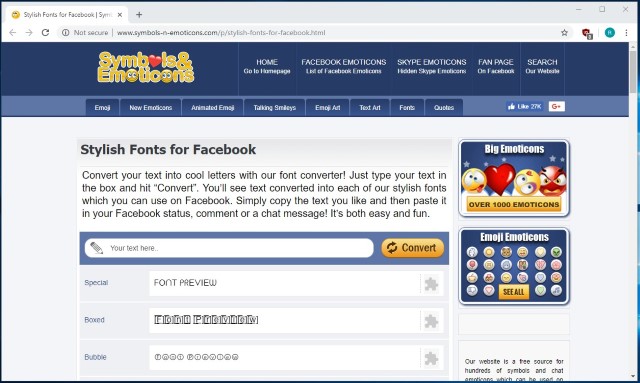
If you want to spice up your posts on Facebook, this is a great tip for you. Since Facebook doesn’t allow us to natively change fonts, most of us end up using the same boring fonts in our posts. Well, with this trick you will be able to use custom fonts thereby making your posts stand out from others. To change the fonts in your Facebook post, head over to this website and convert your text posts into cool looking posts using the website’s awesome font converter. Its quick and easy to use and it will surely spice up your next Facebook post.
SEE ALSO: Top 23 Best Facebook Games of 2019
Ready to try out these Facebook tricks?
We are all well versed with Facebook but these are some tricks we were oblivious to. These are certainly very cool tricks that should come handy in different situations. So, check them out and do let us know if you have a cool Facebook trick of your own that we might have missed out on. Sound off in the comments section below.
from Beebom http://bit.ly/2C9SKux